1. Make sure you are using a compatible browser (Google Chrome, Firefox, MS Edge, or Safari)
2. Clear your browser’s cookies and caches
3. If using a bookmark saved in your browser, delete the bookmark as it may have expired
4. Log into your Defence Gateway account first, then navigate to Westminster using the icon in the Applications area
If still unable to log in, your County/ JMC Administrator should check the following:
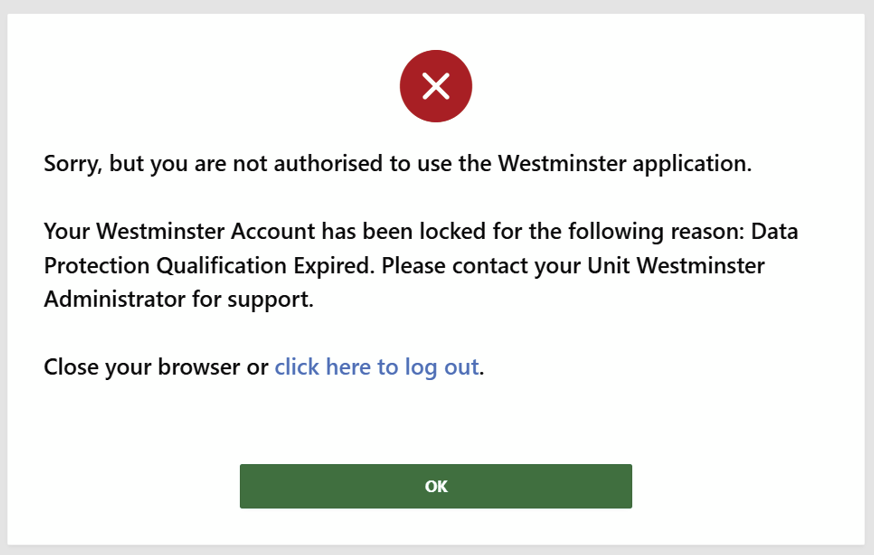
You must have an in-date data protection qualification.
For most people, this is the Responsible for Information (RFI) module, but the Protecting Personal Data (PPD) module can also be used (consult your chain of command if you are unsure which course to complete).
- If you have recently completed RFI on DLE, allow at least 1 working day for it to upload to Westminster
- If you have done the Protecting Personal Data module instead, send your certificate to your County/ JMC/ HQ staff and they will add it to your record
An in-date disclosure is required for most appointments.
User Account & Pnumber Mismatches
The Defence Gateway user name you use for logging into Westminster must be associated with your Westminster pnumber.
Locked User Accounts
If your County/ JMC Administrator has manually locked your user account in Westminster, this must be manually unlocked by them before you will be able to access.
Feed Settings
In HQ Administration the person's record must be added to the correct feed.
Was this article helpful?
That’s Great!
Thank you for your feedback
Sorry! We couldn't be helpful
Thank you for your feedback
Feedback sent
We appreciate your effort and will try to fix the article